
Tutorials in English
abc Word 2010
abc Excel 2010
abc Excel 2003
abc PowerPoint 2010
abc Tutorials:
Operativni sistemi
abc Windows 7
abc Windows XP
abc Operativni sistemi
Microsoft Office
abc Word 2010
abc Word 2007
abc Word 2003
abc Excel 2010
abc Excel 2007
abc Excel 2003
abc Power Point 2010
abc Power Point 2003
abc Access 2010
abc Access 2007
abc Expression Web
abc Front Page 2003
Računari i Internet
abc Brojni sistemi
abc Osnove računara
abc Računarski sistemi
abc Internet osnove
abc HTML5 i CSS3
abc HTML
abc Jasc Animation Shop
abc Flash
abc Movie Maker
abc Računarska grafika
Algoritmi i programski jezici
abc Algoritmi
abc BASIC
abc Turbo Pascal
abc Dev-Pascal
abc Python
abc C
abc C++
abc Java
abc Matlab
abc Asembler
Provjera znanja
abc Quiz-Test
Priručnici:
MatchCAD
MatchCAD 2001
Corel Draw X6
CSS
Učenjenje kroz igru /LEARNING THROUGH GAMES/
|
abc MICROSOFT EXCEL - freee online tutorial
by Željko Grbić and co-authors
This is a basic tutorial of Excel with .gif animations, descriptions and step by step explanations. The tutorial is very usefull for prepariong ECDL Excel exam.
- INTRODUCTION
- OPENING AND CLOSING MICROSOFT EXCEL
Open Microsoft Excel window
- Starting Excel using the Microsoft Office submenu
- Starting Excel using the Windows Start menu
- Starting Excel using a shortcut application icon
- Starting Excel using a document icon
Close MICROSOFT EXCEL window
- Closing: CONTROL menu - CLOSE item
- Closing:CONTROL button - DOUBLE CLICK/
- Closing: FILE menu EXIT item
- Closing: CLOSE button - click/
EXCEL WINDOW
- Parts of a EXCEL window
- ENVIROMENT - Toolbars in a EXCEL window
- GRIDLINES
- TASK PANE
- Zoom In/ Zoom Out Working Area
- PAGE SETUP
- Paper Size
- Page Orientation
- Margins
- Header & Footer
- Preview the Header & Footer - PRINT PREVIEW item from FILE menu
- Preview the Header & Footer - PRINT PREVIEW button from Toolbar
- DATA ENTRY
- Data entry into celll
- Data entry: from Formula bar
- Data entry: DATA FORM-SHEET dialog box
- Data type: Text
- Data type: Date
- Delete character right of the cursor - Delete key
- Delete character left of the cursor - Backspace key
- New line in cell ALT+ENTER
- WORKSHEET
- SELECT WORKSHEET
- WORKSHEET BAR
- INSERT WORKSHEET
- INSERT WORKSHEET - SHIFT + F11
- RENAME WORKSHEET
- DELETE WORKSHEET
- MOVE WORKSHEET
- COPY WORKSHEET
- COLUMN
- Select column
- Insert column, INSERT menu
- Column width, a column header
- Column width, FORMAT menu
- Visible/unvisble cell content #### – Changing column width by column headings
- Delete column
Examples
- Insert column example 01
- Delete COLUMN example 01
ROW
- Select row
- Insert row
- Row height - row header
- Row height - FORMAT menu
- Delete row
Primjeri /EXAMPLES/
- Insert row example 01
- Delete row example 01
- CELL
- Active cell
- Range cell
- Erasing data
- Move a cell content
- Insert cell(s)
- Delete cell(s)
QUIZ - TEST
- Quiz - test
- FORMAT CELLS from TOOLBAR
- Font
- The Font color button 01
- The Font color - the arrow next to the Font color button 02
- Alignment
- Border
- Shadow
FORMAT CELLS - dijalog prozor
- Open Format cell dialog box
- Number tab
- Font tab
- Alignment tab
- Alignment tab - Orientation 01
- Alignment tab - Orientation 02
- Alignment tab - Wrap text
- Alignment tab- Shrink to fit
- Border tab
- Patterns tab - Shadow 01
- Patterns tab - Shadow 02
- Patterns tab - Shadow 03
FORMAT CELLS - examples
- Format cell example 01
- Format cell BACKGROUND example 02
- Format cell NUMBER example 03
- Format cell NUMBER & ALIGNMENT example 04
- Formula - equation /=/
-
Typing values in equal from keyboard (npr =2+3)
- Write equation by using a mouse click 1
- Write equation by using a mouse click 2
- Aritmetičke operacije i operatori - Stepenovanje /EXPONENTIATION/
Addressing
- Relative address 01 (copy)
- Absolute address 01 (copy)
- Funkcije /FUNCTIONS Fx/
- Function SUM - AutoSum button (SIGMA)

- Function SUM - INSERT FUNCTION dialog box

- Function PRODUCT - INSERT FUNCTION dialog box
- Function AVERAGE - INSERT FUNCTION dialog box
- Function COUNT - INSERT FUNCTION dialog box
- Function COUNTA - INSERT FUNCTION dialog box
- Function MAX - Example
- NEW, OPEN, SAVE
- New file: File Menu, New item
- Save the first time file: File Menu, Save As
- Save file: File Menu, Save As item
- Save file - Save button

- Save file: shortcut keys CTRL+S

- Open file: Open Recently
- Open file: File Menu - Open Item
- Open file: Open button

- Open file: Shortcut keys Ctrl+O

FIND, REPLACE
- Find: EDIT menu FIND item
- Find: Shortcut keys Ctrl+F

- Replace: EDIT menu REPLACE item
BLOCK, CUT, COPY, PASTE
- Select range
- Select all: SELECT ALL BUTTON
- Select all: Shortcut keys CTRL+A
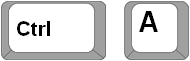
- Select the cells witch are not near each other: CTRL+CLICK
- Copy: EDIT menu COPY item
- Move: EDIT menu CUT item
- Move: From one worksheet to another worksheet
- SORT
- SORT ASCENDING - from TOOLBAR

- SORT DESCENDING from TOOLBAR

- SORT ASCENDING - dialog box
- SORT DESCENDING - dialog box
- Sortiranje po tri kriterija
DATA FILTER
- Autofilter
- CHART
- Standard types of chart
- Drawing CHART
- Create chart by F11 key
PRINT
- PRINT - FILE menu - PRINT item
- Open PRINT dilog box by shortcut keys CTRL + P
- Printing gridlines
APPENDIX
- Decrease decimal places

- Increase decimal places

- Fill marker

Examples:
- Create a chart: Iterations
- Create a chart: Iterations - change number of data
- Create a chart: Speed
- Create a chart: Speed - change data
- Create a chart: Histogram
QUIZ - TEST
- Quiz - test
|